
Novation FLkey 61 61-Key MIDI Keyboard for FL Studio
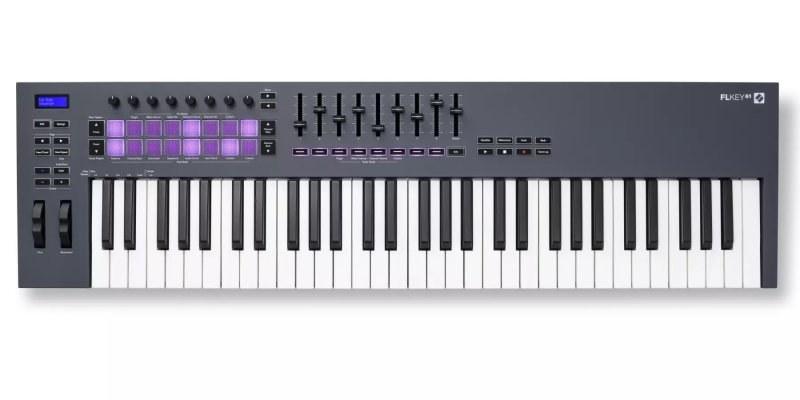
The Novation FLkey 61 is a 61-key MIDI keyboard designed for FL Studio: its pads program the step sequencer, its faders run the mixer and its buttons browse Image-Line plug-in presets, so you can build a whole track without reaching for the mouse every few seconds.
What sets it apart
- Dedicated FL Studio scripts: Channel Rack, Mixer and step sequencer at your fingertips
- 16 velocity-sensitive RGB pads that light up the steps of the current pattern
- 9 x 45 mm faders and 8 pots for volume, panning and automation
- Scale mode and three chord modes to play in key with one finger
- Score Log button that recovers the last five minutes you played
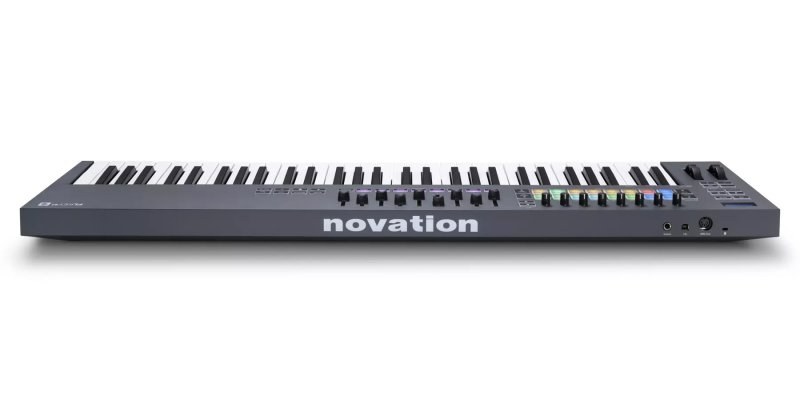
- 5-pin MIDI output and sustain pedal input
Why a keyboard made for FL Studio
A general-purpose MIDI keyboard sends notes and controller numbers; it is then up to you to assign each control to a software function. The FLkey 61 arrives already speaking FL Studio's language. Once detected, its controls know what the Channel Rack, the Mixer and the step sequencer are.
Novation requires FL Studio 21.0.3 or later for these scripts. FL Studio detects the keyboard and sets it up in its MIDI settings automatically, and a manual procedure is documented in case detection fails.
Programming beats without leaving the keys
In Sequencer mode, the sixteen pads become the steps of FL Studio's sequencer: switch snare or hi-hat hits on and off just as you would on a drum machine. In Channel Rack mode, the pads select and play the instruments in the rack.
Instrument mode turns the pads into triggers for FPC, Slicex and Fruity Slicer, ideal for chopping a loop and replaying it by hand. Note Repeat retriggers notes at a chosen rate for tight, even hi-hat rolls.
Mixing and automating by hand
The eight pots change role with the selected mode: parameters of the focused plug-in, Mixer volume or pan, Channel Rack volume or pan, or your own custom assignments. The nine faders handle Mixer tracks in banks of eight, with the ninth reserved for master volume.
Turning a knob while recording captures automation, which sounds more natural than a curve drawn with the mouse. The Quantise, Metronome, Undo and Redo buttons trigger the matching FL Studio functions directly.
Tools for players who don't read music
Scale mode keeps the keys and pads locked to the key you choose. The three chord modes (Fixed, Scale and User) play a full chord from a single key, or store a progression to replay on the fly.
And if a great idea slips by while you were jamming without recording, the Score Log button retrieves the last five minutes of notes played into FL Studio.
Specifications
| Keyboard | 61 velocity-sensitive keys, pitch and modulation wheels |
|---|---|
| Pads | 16 velocity-sensitive RGB pads |
| Controls | 8 pots, 9 x 45 mm faders with 9 buttons |
| Display | 2-line, 16-character screen |
| Software required | FL Studio 21.0.3 or later for full integration |
| Connections | USB B, 5-pin MIDI out, 1/4-inch sustain pedal input |
| Power | USB bus powered, no power supply included |
| Operating systems | Windows 11, 10, 8.1; macOS 10.15 to 13 |
| Dimensions | 952 x 258 x 77 mm (62 mm without pots) |
| Included software | Six-month FL Studio Producer Edition trial, plug-ins from AAS, GForce, Spitfire, XLN, Klevgrand |
What it's for
- Programming beats in FL Studio's step sequencer from the pads
- Recording in-key chords and melodies with Scale and chord modes
- Doing a first mix on the faders without touching the mouse
- Chopping a loop in Slicex and playing it back by hand
- Driving an external synth from the 5-pin MIDI output
Compared with other manufacturers
Other manufacturers offer 61-key keyboards with pads and faders. Here is how they differ from the FLkey 61:
| Manufacturer | Model | What sets it apart |
|---|---|---|
| Novation | FLkey 61 | Dedicated FL Studio scripts, Sequencer mode, Score Log |
| Akai Professional | MPK261 | General-purpose controller with MPC-style pads for several DAWs |
| Arturia | KeyLab Essential 61 | Versatile controller bundled with the Analog Lab instrument |
| M-Audio | Oxygen Pro 61 | Semi-weighted keys, pads and faders for several DAWs |
| Nektar | Impact LX61+ | Integration through Nektar drivers across several DAWs |
Frequently asked questions
- Does the FLkey 61 work with Ableton Live or other DAWs?
- Yes, as a standard MIDI keyboard: keys, pads and faders can be assigned with MIDI learn or Custom Modes. The dedicated features, such as Sequencer mode, are specific to FL Studio.
- Which version of FL Studio do I need?
- FL Studio 21.0.3 or later. The keyboard comes with a six-month trial of FL Studio Producer Edition if you don't own it yet.
- Can I use it without a computer?
- Yes, to control a device from the 5-pin MIDI output: power it from a standard 5 V USB supply rated at least 500 mA. Play and Stop then send start and stop messages to your hardware.
- FLkey or Launchkey: which one should I choose?
- The FLkey is tuned for FL Studio only. If you mostly work in Ableton Live, Logic or Cubase, the Launchkey range is built for several DAWs at once.
Avis clients
Making beats in FL Studio with the FLkey 61? Tell us about your tracks.
Aucun avis pour le moment. Soyez le premier à partager votre expérience après votre achat.