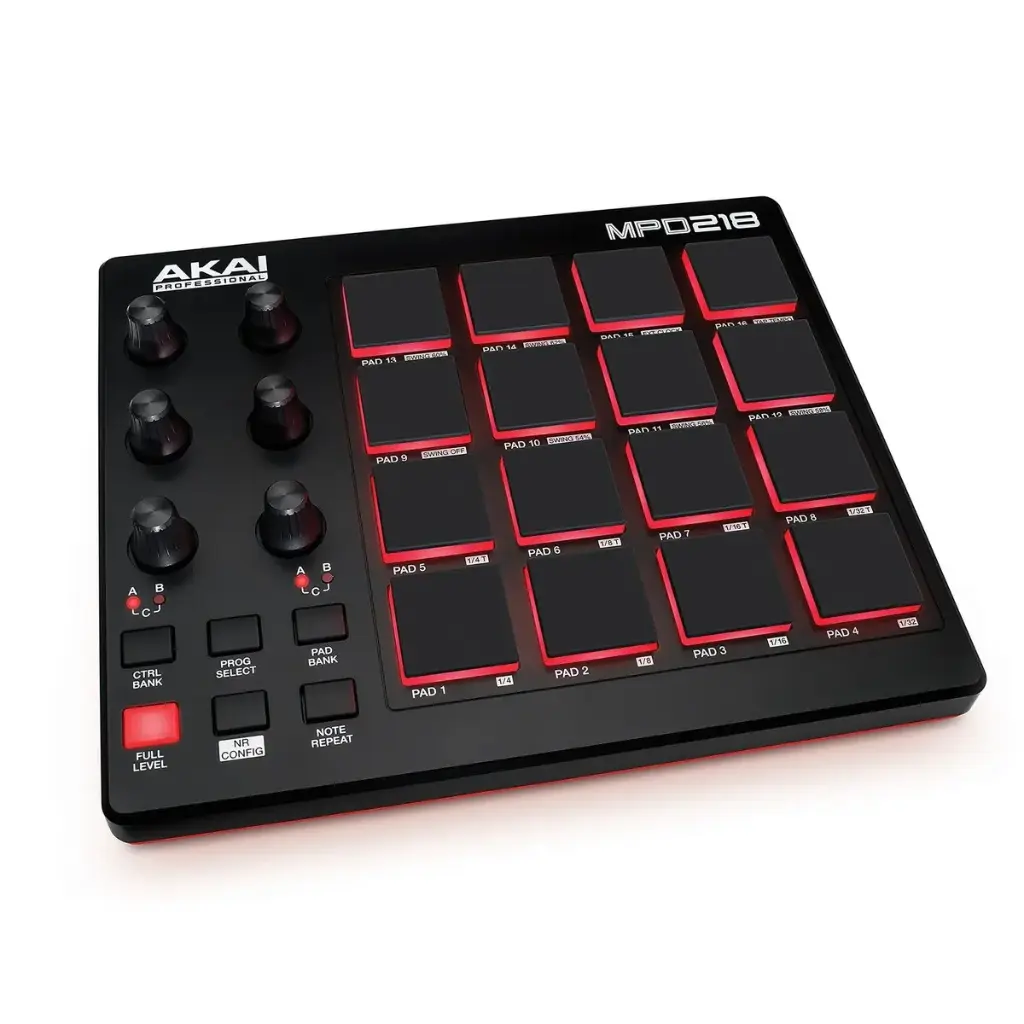
Akai MPD218 - Pad Controller
Discover the Akai MPD218 pad controller, an ultra-responsive USB interface featuring 16 thick, assignable MPC pads that will transform your beatmaking into an intuitive and dynamic experience.
This content will be shared across all product pages.
Pure "Finger Drumming".
You already have a MIDI keyboard for your melodies, but tapping drum rhythms on piano keys is sorely lacking in groove ? Are you looking for that legendary feel that defined Hip-Hop and electronic music for the last 30 years? You need real pads. You need the AKAI MPD218 .
At Garage à Musique, we consider the MPD218 the ultimate and most accessible tool for rhythmic beatmaking . Unlike the tiny pads found on most hybrid keyboards, the MPD218 offers 16 true "Thick Fat" MPC-style pads . They are ultra-sensitive, thick, and react to the slightest nuance of your fingers. Whether you're using FL Studio, Ableton, Logic, or MPC Beats, it's the perfect plug-and-play controller to humanize your drums.
Why the MPD218 is essential in the studio:
Les Pads "Thick Fat" : AKAI n'a pas fait de compromis. Ce sont les mêmes pads épais et ultra-réactifs que l'on retrouve sur leurs modèles haut de gamme. Parfaits pour les roulements rapides et les frappes lourdes.
L'Arsenal du Beatmaker (Note Repeat) : Il intègre les fonctions mythiques des MPC : le Note Repeat (pour créer des hi-hats trap ultra-rapides) et le Full Level (pour que chaque frappe soit au volume maximum, idéal pour les kicks percutants).
Contrôle Total du Mix : 6 potentiomètres rotatifs (assignables sur 3 banques, pour un total de 18 contrôles) vous permettent de sculpter vos effets, vos filtres ou de faire vos automations en temps réel.
Ultra-Portable : Moins de 5 cm d'épaisseur. Il se glisse dans n'importe quel sac à dos et s'alimente directement par le port USB de votre ordinateur.
Comparison: MPD218 vs. The Competition
How to choose the right pad controller for your rhythms?
| Characteristic | AKAI MPD218 | AKAI MPD226 | Novation Launchpad Mini |
| Type of Pads | 16 "Thick Fat" Pads | 16 "Thick Fat" RGB Pads | 64 Small Pads (Grid) |
| Sensitivity | Velocity & Pressure | Velocity & Pressure | Velocity only |
| Physical Checks | 6 Potentiometers | 4 Potentiometers + 4 Faders | None |
| Screen / Sequencer | ❌ No | ✅ Yes (Screen) | ❌ No |
| Ideal for... | Pure "Finger Drumming" | Complete control of the DAW | Launching clips (Ableton) |
| Our opinion | The best value for money in terms of rhythm. | The big brother for the pros. | Made for the arrangement, not for the drums. |
Technical Specifications
Pads : 16 pads "Thick Fat" rétroéclairés (Rouge), sensibles à la vélocité et à la pression
Banques de pads : 3 banques accessibles via bouton dédié (soit 48 pads assignables)
Potentiomètres : 6 boutons rotatifs à 360° (assignables)
Banques de contrôles : 3 banques (soit 18 potentiomètres assignables au total)
Fonctions intégrées : MPC Note Repeat, MPC Full Level, 16 Level
Connectivité : 1x port USB (Type-B)
Alimentation : Auto-alimenté par le bus USB (pas d'adaptateur mural requis)
Compatibilité : Mac et PC (Plug-and-Play, aucun pilote nécessaire)
Dimensions: 23.9 cm x 20.1 cm x 4.1 cm
Poids : 0.75 kg (1.65 lbs)
📦 In the box:
1x Contrôleur AKAI MPD218
1x Câble USB
Cartes de téléchargement pour les logiciels inclus (MPC Beats, Ableton Live Lite, etc.)
FAQ - The most frequently asked questions on the web
1- Does the MPD218 have built-in drum sounds?
No. It's a MIDI controller. It doesn't produce any sound by itself. It acts like a "joystick" to trigger the sounds of virtual instruments (VSTs) or software drum machines on your computer.
2- Is it suitable for a beginner in "Finger Drumming"?
It's literally the best choice for beginners! The pads are very sensitive, which prevents finger fatigue, and its classic 4x4 layout is the industry standard for learning drum routines.
3- Can I use it at the same time as a MIDI keyboard?
Absolutely. You can connect your USB master keyboard and the MPD218 to your computer at the same time. Your DAW (music software) will handle both signals simultaneously. You'll be able to play bass on the keyboard and drums on the MPD218.
4- Is it compatible with FL Studio or Logic Pro?
Yes, it's 100% compatible with all DAWs on the market (FL Studio, Logic, Ableton, Cubase, Studio One, etc.). Simply assign it in your software's MIDI settings.
5- Can I connect it to my iPad or iPhone?
Yes! With an Apple "Lightning to USB Camera Adapter" (or directly via USB-C depending on your iPad model), the MPD218 will work perfectly with applications like GarageBand, BeatMaker or Koala Sampler.
Pure "Finger Drumming".
You already have a MIDI keyboard for your melodies, but tapping drum rhythms on piano keys is sorely lacking in groove ? Are you looking for that legendary feel that defined Hip-Hop and electronic music for the last 30 years? You need real pads. You need the AKAI MPD218 .
At Garage à Musique, we consider the MPD218 the ultimate and most accessible tool for rhythmic beatmaking . Unlike the tiny pads found on most hybrid keyboards, the MPD218 offers 16 true "Thick Fat" MPC-style pads . They are ultra-sensitive, thick, and react to the slightest nuance of your fingers. Whether you're using FL Studio, Ableton, Logic, or MPC Beats, it's the perfect plug-and-play controller to humanize your drums.
Why the MPD218 is essential in the studio:
Les Pads "Thick Fat" : AKAI n'a pas fait de compromis. Ce sont les mêmes pads épais et ultra-réactifs que l'on retrouve sur leurs modèles haut de gamme. Parfaits pour les roulements rapides et les frappes lourdes.
L'Arsenal du Beatmaker (Note Repeat) : Il intègre les fonctions mythiques des MPC : le Note Repeat (pour créer des hi-hats trap ultra-rapides) et le Full Level (pour que chaque frappe soit au volume maximum, idéal pour les kicks percutants).
Contrôle Total du Mix : 6 potentiomètres rotatifs (assignables sur 3 banques, pour un total de 18 contrôles) vous permettent de sculpter vos effets, vos filtres ou de faire vos automations en temps réel.
Ultra-Portable : Moins de 5 cm d'épaisseur. Il se glisse dans n'importe quel sac à dos et s'alimente directement par le port USB de votre ordinateur.
Comparison: MPD218 vs. The Competition
How to choose the right pad controller for your rhythms?
| Characteristic | AKAI MPD218 | AKAI MPD226 | Novation Launchpad Mini |
| Type of Pads | 16 "Thick Fat" Pads | 16 "Thick Fat" RGB Pads | 64 Small Pads (Grid) |
| Sensitivity | Velocity & Pressure | Velocity & Pressure | Velocity only |
| Physical Checks | 6 Potentiometers | 4 Potentiometers + 4 Faders | None |
| Screen / Sequencer | ❌ No | ✅ Yes (Screen) | ❌ No |
| Ideal for... | Pure "Finger Drumming" | Complete control of the DAW | Launching clips (Ableton) |
| Our opinion | The best value for money in terms of rhythm. | The big brother for the pros. | Made for the arrangement, not for the drums. |
Technical Specifications
Pads : 16 pads "Thick Fat" rétroéclairés (Rouge), sensibles à la vélocité et à la pression
Banques de pads : 3 banques accessibles via bouton dédié (soit 48 pads assignables)
Potentiomètres : 6 boutons rotatifs à 360° (assignables)
Banques de contrôles : 3 banques (soit 18 potentiomètres assignables au total)
Fonctions intégrées : MPC Note Repeat, MPC Full Level, 16 Level
Connectivité : 1x port USB (Type-B)
Alimentation : Auto-alimenté par le bus USB (pas d'adaptateur mural requis)
Compatibilité : Mac et PC (Plug-and-Play, aucun pilote nécessaire)
Dimensions: 23.9 cm x 20.1 cm x 4.1 cm
Poids : 0.75 kg (1.65 lbs)
📦 In the box:
1x Contrôleur AKAI MPD218
1x Câble USB
Cartes de téléchargement pour les logiciels inclus (MPC Beats, Ableton Live Lite, etc.)
FAQ - The most frequently asked questions on the web
1- Does the MPD218 have built-in drum sounds?
No. It's a MIDI controller. It doesn't produce any sound by itself. It acts like a "joystick" to trigger the sounds of virtual instruments (VSTs) or software drum machines on your computer.
2- Is it suitable for a beginner in "Finger Drumming"?
It's literally the best choice for beginners! The pads are very sensitive, which prevents finger fatigue, and its classic 4x4 layout is the industry standard for learning drum routines.
3- Can I use it at the same time as a MIDI keyboard?
Absolutely. You can connect your USB master keyboard and the MPD218 to your computer at the same time. Your DAW (music software) will handle both signals simultaneously. You'll be able to play bass on the keyboard and drums on the MPD218.
4- Is it compatible with FL Studio or Logic Pro?
Yes, it's 100% compatible with all DAWs on the market (FL Studio, Logic, Ableton, Cubase, Studio One, etc.). Simply assign it in your software's MIDI settings.
5- Can I connect it to my iPad or iPhone?
Yes! With an Apple "Lightning to USB Camera Adapter" (or directly via USB-C depending on your iPad model), the MPD218 will work perfectly with applications like GarageBand, BeatMaker or Koala Sampler.
Avis clients
Aucun avis pour le moment. Soyez le premier à partager votre expérience après votre achat.