
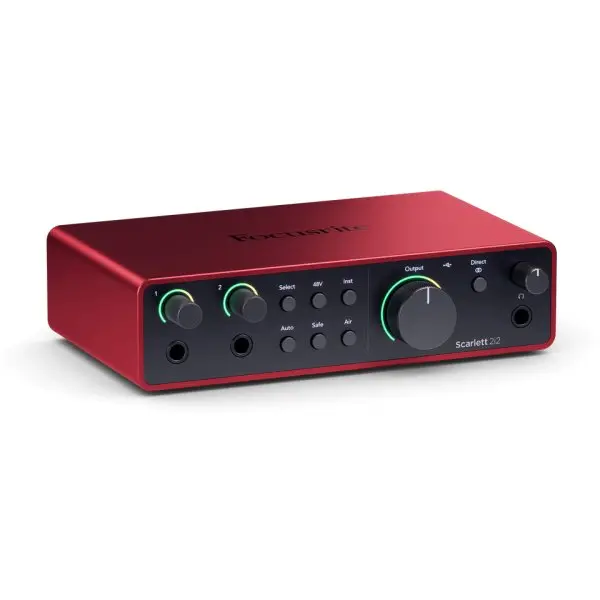
Focusrite Scarlett 2i2 4th Gen USB-C Audio Interface
The Scarlett 2i2 4th Gen is a USB-C audio interface with two mic preamps: it records two microphones, two instruments or one of each at the same time, each on its own track. It suits two people singing together, a two-host podcast or an acoustic guitar miked in stereo, with automatic settings that save beginners from ruined takes.
What sets it apart
- Two mic preamps with 69 dB of gain, each on a combo input
- Auto Gain: the interface listens and sets the level itself
- Clip Safe: pulls the gain down in time when a shout or a hard strum gets too hot
- Two high-impedance inputs for guitar or bass
- Loopback to blend computer audio into a live stream
- Easy Start tool that walks you through setup step by step
Two sources, two tracks
The name “2i2” means two inputs, two outputs. In practice, it is the difference between recording one person and recording two. Two singers facing each other, a host and a guest, one mic on the body of a guitar and another near the neck: each signal stays separate, and you balance them in the mix.
Each input takes an XLR or a jack connector. An Inst button switches the input to high impedance for a guitar plugged in direct.
Levels that set themselves
Setting gain is where most beginners lose a take: too low and the sound is thin and noisy, too high and it distorts. With Auto Gain, you press the button, sing or play for a moment, and the 2i2 picks the level. Clip Safe takes over while you record and lowers the gain before clipping.
The preamp offers 69 dB of gain and accepts up to 16 dBu at the mic input. The two Air modes shape the sound at the source: Presence for a more open vocal, Harmonic Drive for more body.
For streaming and content creation
Loopback sends your computer's audio back to two virtual inputs. In streaming software, you can then capture your voice, your guitar and the music or game playing in the background, with no return cable. You set it up in Focusrite Control 2, which also comes as a mobile app for adjusting levels remotely.
Specifications
| Mic preamps | 2, XLR and jack combo inputs |
|---|---|
| Gain | 69 dB (mic and line), 62 dB (instrument) |
| Instrument inputs | 2, 1 MΩ impedance |
| Maximum input level | 16 dBu mic, 22 dBu line, 12 dBu instrument |
| Dynamic range | 116 dB A-weighted (mic), 120 dB (line outputs) |
| Outputs | 2 balanced line outputs, 1 headphone |
| Automatic features | Auto Gain, Clip Safe |
| Air modes | Presence, Harmonic Drive |
| Sample rates | 44.1 to 192 kHz, 24-bit |
| Power | USB-C bus powered, 900 mA |
| Size | 180 × 117 × 47.5 mm, 595 g |
| Software | Ableton Live Lite, Pro Tools Intro+, Cubase LE, Hitmaker Expansion |
What it's for
- Two-mic podcast or interview
- Vocal duo, or voice and guitar each on its own mic
- Acoustic guitar in stereo with two mics
- Live streaming with computer audio via loopback
- A first home studio, with automatic level setting
Compared with other manufacturers
Two-input interfaces from other manufacturers, and what sets them apart from the 2i2:
| Manufacturer | Comparable model | How it differs |
|---|---|---|
| Universal Audio | Volt 2 | Vintage mode on the preamps, no automatic gain setting |
| Audient | EVO 4 | Smartgain automatic level setting, more compact housing |
| MOTU | M2 | Front-panel LCD level meters |
| Solid State Logic | SSL 2 | Per-input 4K switch inspired by SSL consoles |
| Arturia | MiniFuse 2 | MIDI ports and an extra USB port on the back |
Frequently asked questions
- What is the difference between the 4th Gen and 3rd Gen 2i2?
- The 4th Gen adds Auto Gain and Clip Safe, raises preamp gain to 69 dB, offers two Air modes instead of one and uses converters rated at 120 dB of dynamic range at the outputs.
- Can I record two microphones at the same time?
- Yes. Both preamps work together and each mic lands on its own track, with its own gain setting.
- Do I need a driver for the Scarlett 2i2?
- None on a Mac. On Windows 10 or 11, install Focusrite Control 2, which includes the driver and gives you access to the interface settings.
- How do I record my computer's audio along with the mic?
- Through loopback: in Focusrite Control 2, computer audio is returned on virtual inputs 3 and 4. Select them as the source in your recording or streaming software, and mute their monitoring to avoid feedback.
Avis clients
Aucun avis pour le moment. Soyez le premier à partager votre expérience après votre achat.